awesome-agentic-ai-zh
🤖 One map from “what is an AI agent?” to “I can build a reliable system.”
Pick a route, then walk it one step at a time. Concepts, exercises, and resources are already in order.



📱 On a phone, read the docs site.
🎯 What does this map help you do?
An AI Agent is an AI system that can decide what to do next and take action toward a person's goal. It reads the situation, chooses the next step, and uses tools when needed; based on the result, it continues, corrects course, stops, or hands control back. It can do work automatically, but only within a person's rules and permissions. A one-shot chatbot or fixed script is not necessarily an Agent. The map covers three things in order:
- Get the basics: what an LLM (Large Language Model, reads and writes language), a prompt, an API (Application Programming Interface, programs request a service), and a token are.
- Then build something: let a model call tools, run an agent loop, read documents, remember things.
- Then make it reliable: add permissions, Eval, human approval, observability, and failure recovery.
This repo is a learning roadmap + curated resources + small runnable examples. For chapter-length depth we point to the official docs, Datawhale Hello-Agents, or a cookbook rather than rewriting an encyclopedia. When a model connection is needed, each exercise explains the cloud or local path.
Chapters explain important terms in plain language at first use. Forgot one? See the glossary.
🚀 Start now
- Never written code: start at Stage 0: Foundations. If APIs or CLI Agents are new, use the zero-to-setup guide beside it.
- Already know Python, Git, and APIs: start at Stage 1: LLM fundamentals.
- Not sure which route fits: read the Track A / Track B table below.
Before Track A or Track B, check Stage 0–2. If you only want everyday AI use, go straight to the role guide.
| What do you want to do? | Route | Route entrance |
|---|---|---|
| Get work done with a CLI agent — Claude Code, Codex, OpenCode | Track A — CLI Power User | A1: Pick a CLI agent |
| Write your own agent, tool loop, workflow, and service | Track B — Agent Builder | Stage 3: First agent loop |
| Use AI safely in daily life, no coding for now | Everyday user route | Everyday user guide |
💻 Expand: clone it to your machine
git clone https://github.com/WenyuChiou/awesome-agentic-ai-zh.git
cd awesome-agentic-ai-zh
Then open stages/00-foundations.en.md, or jump to your first stop above.
Stage 0 through Stage 8, plus the Stage 7.5 reading stop
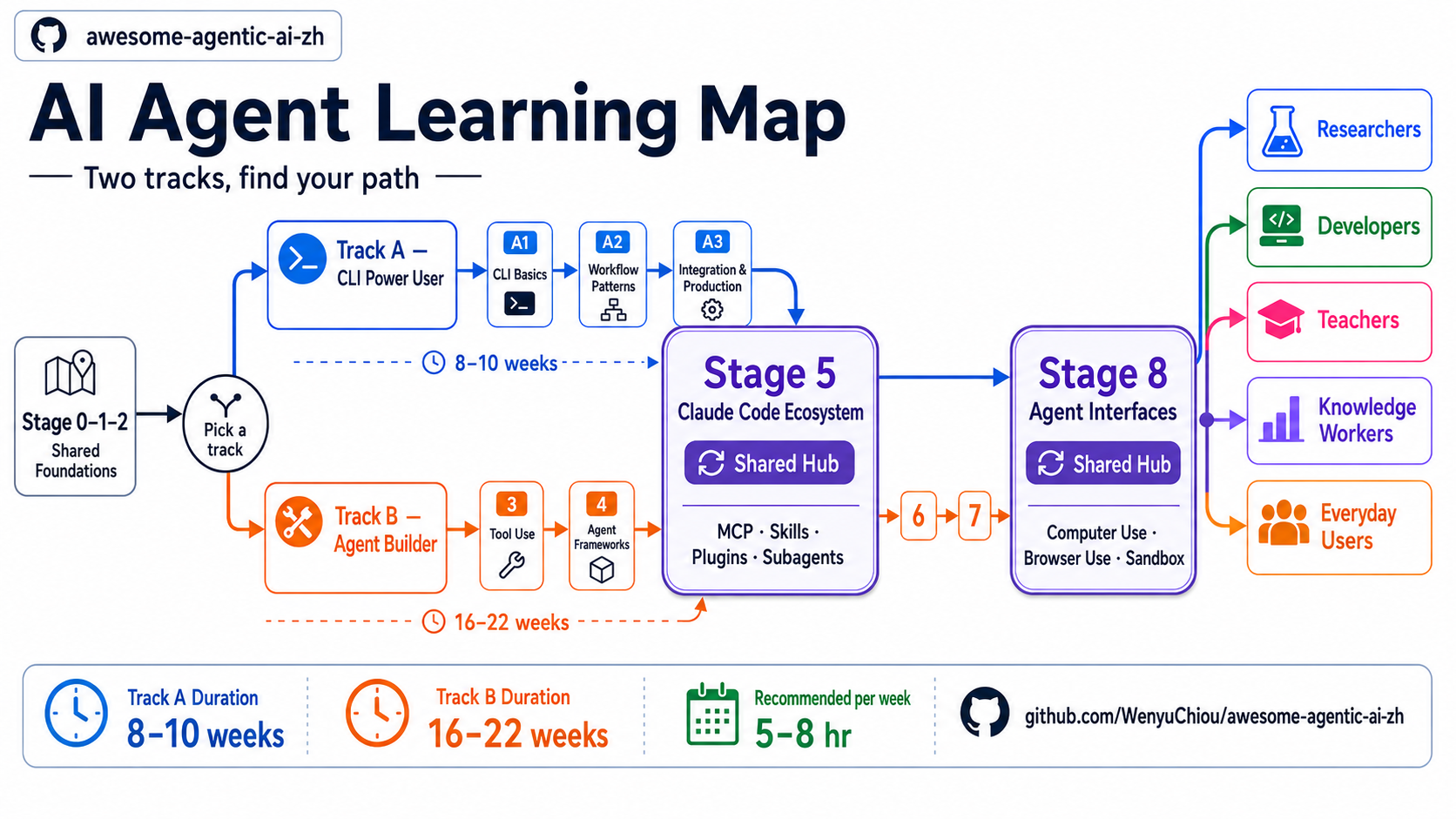
The map has 8 topic stages + the Stage 0 readiness check + the Stage 7.5 advanced reading stop: 10 learning stops in total. Track A / B readers first check the shared Stage 0–2 foundations; skip Stage 0 if you already know Python, Git, and APIs. Everyday users can go straight to the role guide.
Shared foundations: Stages 0–2
| Stage | What it settles | What you can do after |
|---|---|---|
| 0 · Foundations | Machine and tools ready? | Call a public API in Python, read JSON (JavaScript Object Notation, a text data-exchange format), save with Git |
| 1 · LLM fundamentals | What are LLM, token, context; how do models differ? | Call an LLM and pick a cloud or local model |
| 2 · Prompt design | How to state goal, data, rules, output clearly? | Compare Zero-Shot, One-Shot, Few-Shot, and the boundary of CoT (Chain-of-Thought, reason through intermediate steps) |
Track A: get work done with a CLI agent
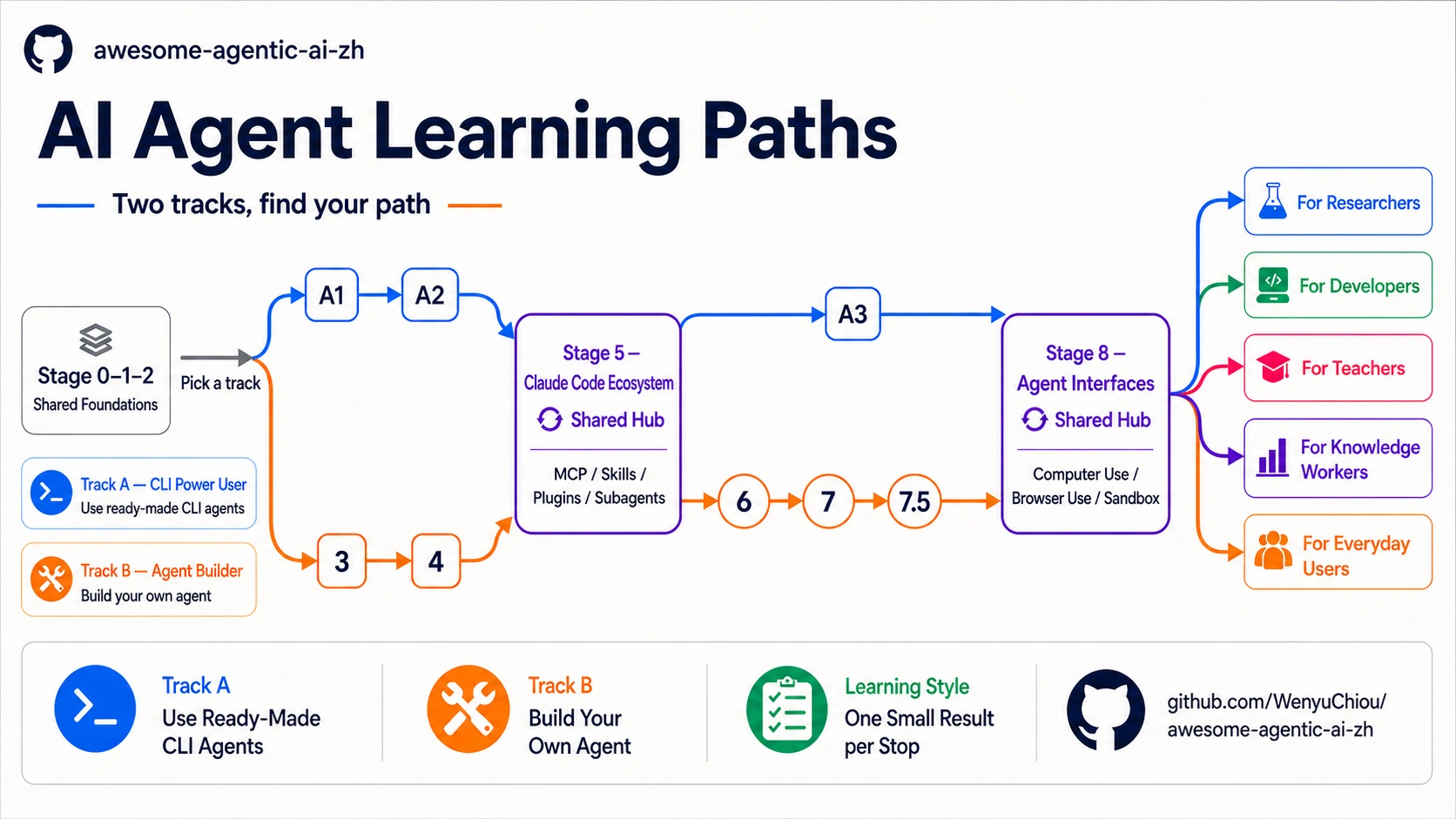
Route: A1 → A2 → Stage 5 → A3 → Stage 8. Stage 8 is recommended, not required for Track A Capstone.
| Order | What it settles | What you can do after |
|---|---|---|
| A1 · Pick a CLI agent | What are OpenRouter, OpenCode, Pi, Ollama? | Pick a tool and finish one small task |
| A2 · Build a repeatable process | How to keep rules and steps for next time? | Write project instructions, a Skill, a reusable workflow |
| 5 · Claude Code ecosystem | How do MCP, Skills, Plugins, Hooks, Subagents differ? | Read core 5.1–5.4; choose 5.5–5.8 only when your work needs them |
| A3 · Plug into real work | How to safely connect tools, CI, and team process? | Integrate with least privilege, human checks, a record |
| 8 · Agent interfaces | How does an agent drive a browser, screen, sandbox? | Decide if a task needs CLI, browser, Computer Use, or API |
Track B: build an agent from scratch
| Order | What it settles | What you can do after |
|---|---|---|
| 3 · Tool Use & Your First Agent Loop | How does a model call tools safely and continue? | Build an agent loop with a turn limit and validated arguments |
| 4 · Workflow Graphs & Agent Frameworks | How to draw several steps as one map? | Choose between workflow, agent, graph, framework |
| 5 · Claude Code ecosystem | How do MCP, Skills, Plugins, Hooks, Subagents work together? | Combine tools, rules, reusable capabilities |
| 6 · Memory · RAG (Retrieval-Augmented Generation, retrieve information before answering) | How does an agent search, save, and get back what matters? | Build a minimal RAG, long-term memory, and contextual retrieval flow |
| 7 · Agent Production Engineering: Testable, Observable, Stoppable, and Recoverable | How does an agent stay stable in production? | Add Eval, observability, budget, Human-in-the-loop approval, recovery |
| 7.5 · Advanced agentic concept map | Which advanced patterns are worth knowing? | Pick what you need from 12 concepts such as PAR loop and agent-as-judge |
| 8 · Agent interfaces | How does an agent work beyond the API? | Choose Computer Use, Browser Use, or a code sandbox |
Stage 4 first explains the Workflow Graph, then uses a framework to build it. Stage 7 adds Eval, observability, approval, and recovery for reliability.
🔭 Learning order: Stage 2 Prompt → Stage 3 Agent Loop → Stage 4 Workflow Graph / framework → Stage 5 tools and rules → Stage 6 Context Engineering → Stage 7 production. Prompt, Context, Harness, Loop, and Graph work together; they are not five layers or product generations that replace one another.
Start the Capstone after A3 (Track A) or Stage 8, including 7.5 (Track B). Track progress.
⏱️ View time estimates (planning aid, not a deadline)
- Track A: about 8–10 weeks, using an existing CLI agent to get work done.
- Track B: main path about 16–22 weeks; at 5–8 hours a week, usually 5–7 months.
- Stage 5 is the tools-and-rules hub: Track A uses them, Track B combines them.
- Stage 8 is the interface hub: Track A delegates, Track B builds them in.
The timeline is a planning aid. Finish the step in front of you; no need to read the whole map at once.
Keep going by who you are
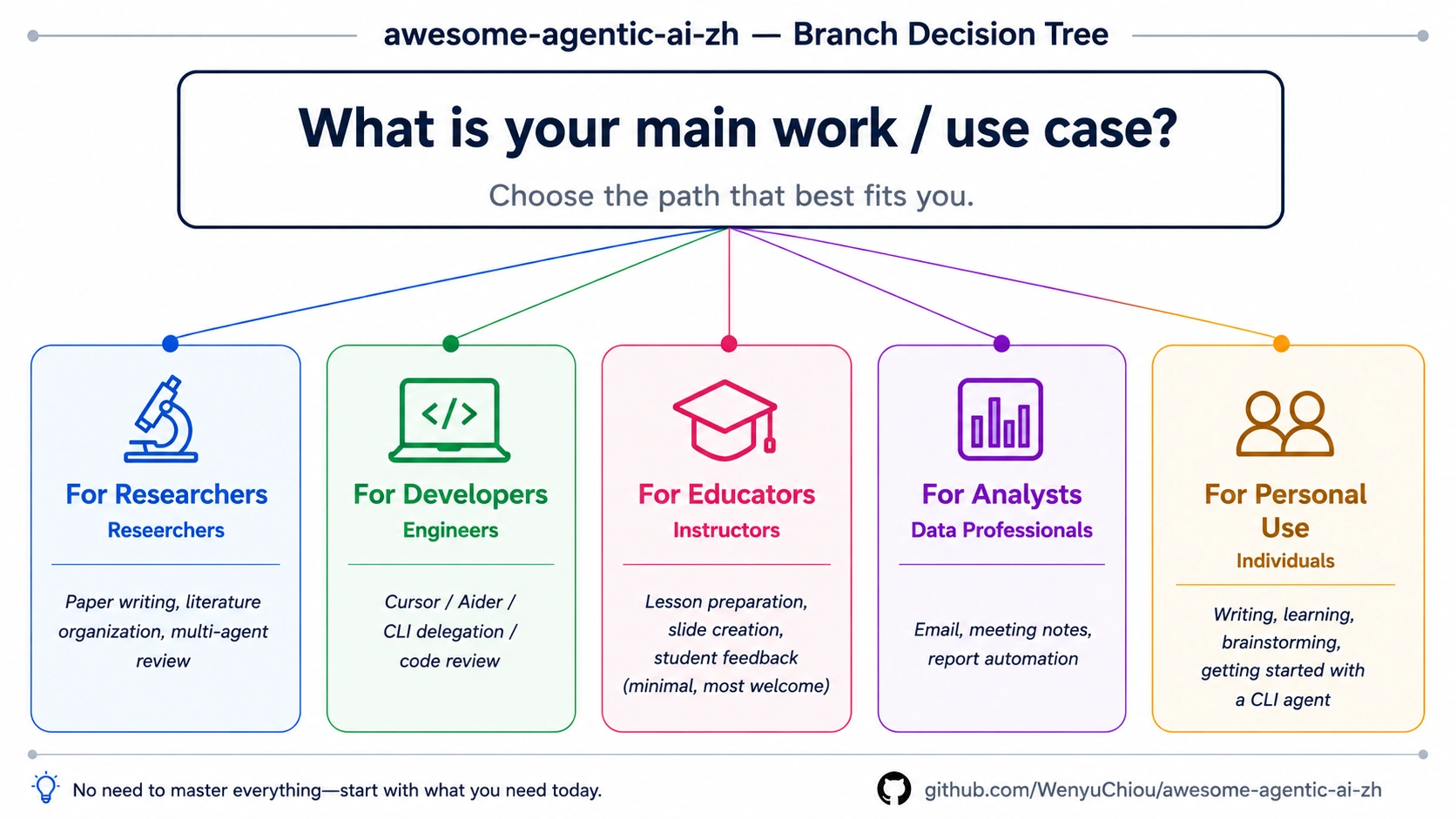
| Route | Who it fits | What you will handle |
|---|---|---|
| 🔬 Researcher | Grad students, postdocs, PIs | Literature evidence, reproducible pipelines, multi-agent review |
| 💻 Developer | Software engineers | CLI delegation, code review, tests and rollback |
| 🎓 Teacher | Teachers, instructors | Lesson prep, feedback, privacy, teaching prompts |
| 📊 Knowledge worker | Consultants, PMs, analysts | Email, meeting, reporting workflows |
| 👥 Everyday user | AI users who may not code | Writing, learning, privacy, safe use |
💡 How do you learn without getting stuck?
- One Stage at a time: answer that chapter's core question first.
- Read the core terms and required reading first: the exercises use them directly.
- Copy the first command as-is: run the offline test first, don't retype a blank file.
- Change one thing at a time: rerun the test right after, so you know what caused the result.
- Meet the completion check before moving on: understanding is not the same as doing.
📚 Learning entrances to bookmark
Only the most-used entrances are here; the full list is in RESOURCES.en.md. Stars mean learning priority, not a ranking.
| Purpose | Entrance | When to use it | Priority |
|---|---|---|---|
| Start | Zero-to-setup guide | First install and first run | ⭐⭐⭐⭐⭐ |
| How to use this material | Before your first hands-on exercise | ⭐⭐⭐⭐⭐ | |
| Progress tracker | Want the next step, or to log what you finished | ⭐⭐⭐⭐ | |
| Learn | Core glossary | You hit an unfamiliar word: token, RAG, MCP | ⭐⭐⭐⭐⭐ |
| Runnable examples | Want to run offline tests and small cases | ⭐⭐⭐⭐⭐ | |
| Hands-on cookbook | Building a Skill, MCP, Office, Zotero, or local LLM | ⭐⭐⭐⭐ | |
| Look it up | Resource toolbox | Not sure if you need a guide, catalog, or cookbook | ⭐⭐⭐⭐⭐ |
| Full resource list | Official docs, courses, communities, further reading | ⭐⭐⭐⭐ | |
| CLI agent selection guide | Starting Track A, or comparing CLI tools | ⭐⭐⭐⭐ | |
| Course and certification map | Separates completion certificates, skill badges, and certification exams | ⭐⭐⭐⭐ |
🤝 Help improve this map
- Wrong content, broken links, or stale information: open an Issue.
- Adding a project or learning resource: say which Stage it teaches, and what.
- Sending a PR: read CONTRIBUTING.en.md and the style guide first.
- Recent changes: see CHANGELOG.md.
🧰 Expand: all the ways to contribute, and the automated checks
You can fix wording, fill in a missing trilingual mirror, report a missing topic, or maintain a Stage or role route long term. For a new GitHub project link, the automated check shows archive status, license, and last update; inclusion stays a maintainer call based on learning value.
Full roles and rules are in CONTRIBUTORS.md.
🙏 Key inspirations and related projects
- Datawhale Hello-Agents — for readers who want full chapters and deep hands-on work.
- Datawhale community — a Chinese-language machine learning study community with many reliable entrances.
- liyupi/ai-guide — a breadth-first resource hub; this repo handles the learning order instead.
📖 Expand: contributors and citation format
@misc{awesome_agentic_ai_zh_2026,
  title = {awesome-agentic-ai-zh: A Structured Learning Roadmap for Agentic AI},
  author = {Chiou, Wenyu},
  year = {2026},
  url = {https://github.com/WenyuChiou/awesome-agentic-ai-zh}
}
☕ Support and contact
This learning map is MIT-licensed and stays free and public. Use an Issue for questions; for private contact, email wenyuchiou12@gmail.com.
If this map helped you, a ⭐ Star is welcome, or buy the author a coffee.

⭐ Star History
License
MIT. Maintained by @WenyuChiou.